Introduction
Most healthcare organizations are not short on APIs.
They have APIs for eligibility, clinical data, claims, authorizations, and workflows. But those APIs were built for applications and system-to-system integration, not for AI agents.
That creates a new challenge.
If a partner wants to use an AI assistant to check member eligibility, retrieve care gaps, or start a workflow, the assistant needs a safe and reliable way to use the right healthcare capability.
Today, that usually means more custom work. Partners need to understand the underlying API, build the integration, manage credentials, and handle the operational details around access and usage.
That approach does not scale well as more partners, products, and AI use cases emerge.
The question is no longer whether healthcare organizations have APIs.
The question is how to make those APIs usable by agents in a governed, repeatable way.
How Hyphen Makes APIs Usable by Agents
That is where Model Context Protocol, or MCP, becomes useful.
MCP provides a standard way for AI agents to discover and call tools. Instead of every partner building custom logic for every API, an MCP server can expose selected platform capabilities as well-defined tools agents can use.
At Hyphen, MCP builds on the same foundation as connectors and APIs.
Connectors bring healthcare data into the platform and help share data back out through repeatable integration patterns. APIs make that data and those workflows available to trusted systems and partners. MCP takes the next step by making those same capabilities available to agents.
For example, a partner may want an agent to answer:
Is this member eligible based on their identifier and demographics?
With MCP on Hyphen, that eligibility capability can be exposed as a tool an agent can use.
The agent does not need to understand how the underlying API is implemented, how the data is retrieved, or how authentication is handled. Hyphen manages those platform concerns behind the scenes.
What the agent sees is a clear, usable capability:
- A tool for checking eligibility
- A description of when that tool should be used
- A guided way to provide the information needed to complete the request
This is different from simply giving an agent raw API access.
An API is designed for software systems. An MCP tool is designed for agent workflows. It gives the agent a more purposeful way to use a platform capability without exposing unnecessary implementation detail.
That keeps the agent experience simple while allowing Hyphen to manage the important parts: the underlying API, credentials, access controls, and operational governance.
A Simple Walkthrough
Let’s walk through a common example: creating an MCP server for an eligibility API in Hyphen.
The goal is to expose an existing eligibility API as an MCP tool that can be used by an agent or shared with a trusted partner.
Step 1: Start in AI Studio
MCP servers are managed in Hyphen AI Studio.
From the AI Studio dashboard, users can see their MCP servers and Agents. In this example, we have an Eligibility Assistant agent and an Eligibility API MCP server.
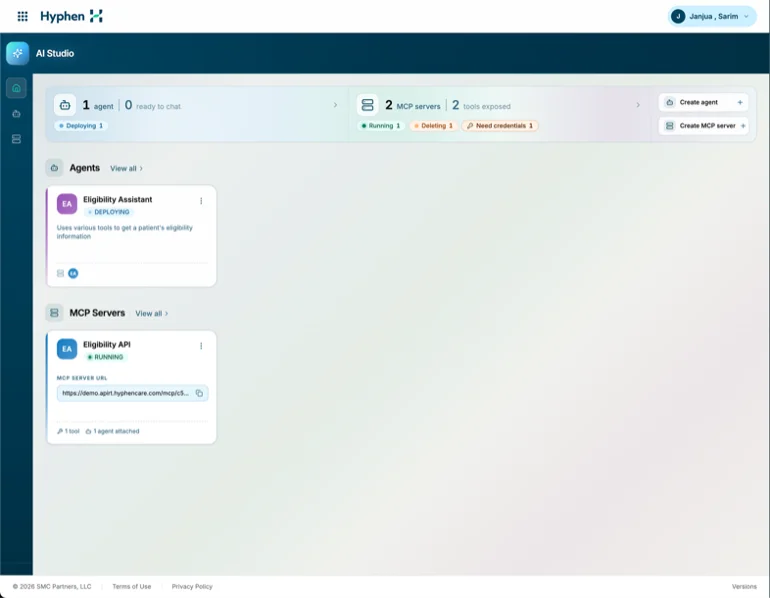
This keeps the roles clear: agents handle the user experience, while MCP servers expose the tools those agents can use.
Step 2: Add the MCP Server Details
The first step is to create the server and provide the target API details.
For this example:
Name: Eligibility MCP

Target Base URL:
https://api.example.com/platform/eligibility-http-outbound-connector/api
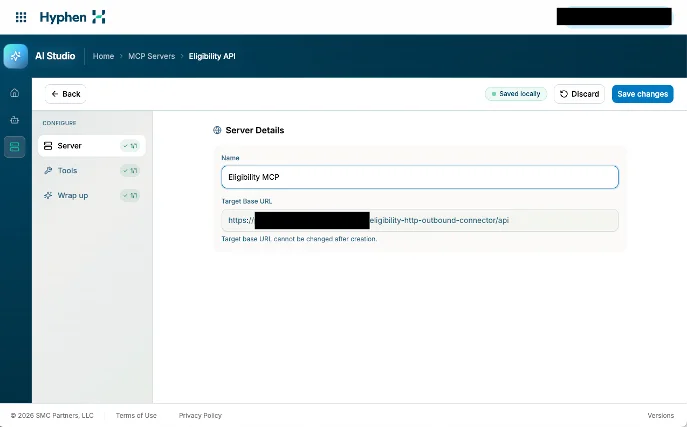
The target base URL is the downstream API Hyphen will call when the MCP tool is used. The MCP server is not replacing the API. It is making that API available in a way agents can use.
Step 3: Add a Tool
Next, users define the tool the agent will see.
For the eligibility use case:
Tool name:
get_eligibility_by_identifier_and_demographics

Description:
Gets a person’s eligibility by their identifier and demographics

Method:
POST

Endpoint:
/v1/eligibility
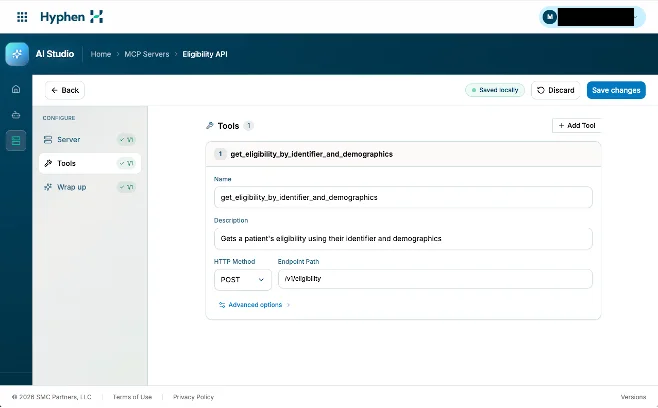
The tool name and description should be specific and easy to understand. Agents use this information to decide when the tool is relevant.
Step 4: Define the Request Details
After the tool is created, users define what information the API needs.
For this eligibility tool, that may include:
identifier
identifierType
assigningAuthority
demographics
  firstName
  lastName
  gender
  dateOfBirth
useAdvancedMatching
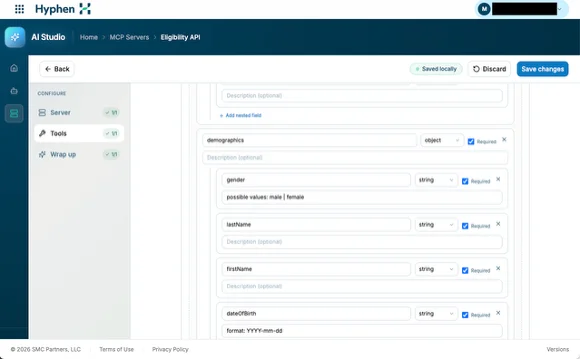
Hyphen also supports request configuration such as query parameters, path parameters, headers, and request body fields when the API requires them.
This step turns the API into a guided tool. Instead of asking an agent to figure out the endpoint directly, Hyphen defines how the capability should be used.
Step 5: Add Credentials
Once the tool is configured, users attach credentials for the downstream API.
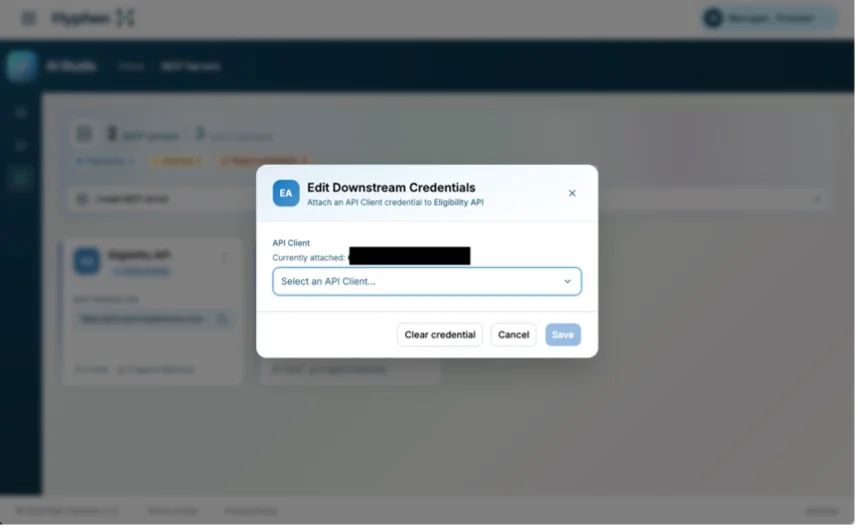
The agent does not need to manage secrets or understand how the underlying API authenticates. Hyphen handles that at the platform layer.
This keeps credential management, access, and governance separate from the agent experience.
Step 6: Review and Validate
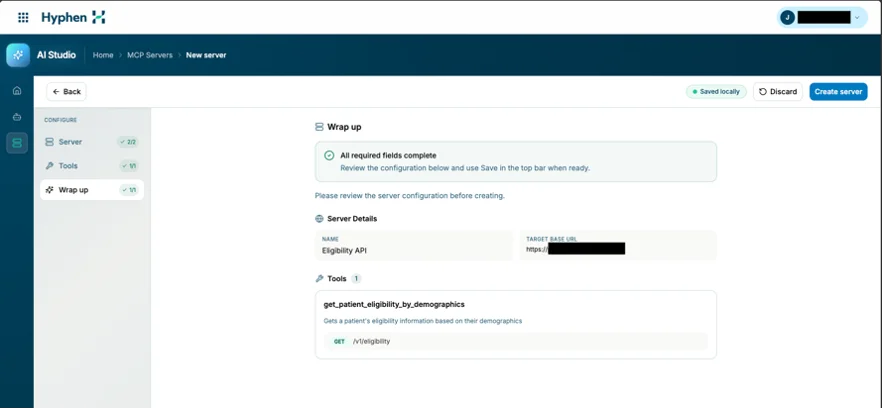
Before the MCP server is saved, users can review the configuration in the wrap-up section.
This includes the server details, target base URL, configured tools, endpoint, request fields, and credential setup.
It is a final checkpoint to confirm that the tool is ready to use.
Once everything is complete, Hyphen generates an MCP server URL that can be attached to an agent or shared with a trusted partner.
Why This Matters
The value of MCP on Hyphen is not that it introduces another way to call an API.
Healthcare already has plenty of ways to call APIs.
The value is that MCP builds on the platform foundation customers already create in Hyphen. When customers bring their data into Hyphen, they should not have to repeat that work for every new product, partner, or AI use case.
They can ingest their data once and use it in multiple ways:
- Activate and use Hyphen products
- Expose APIs for trusted partners
- Create MCP tools on top of those APIs
- Make the same underlying data and workflows available to agents
That matters for several reasons.
Faster Agent Enablement
Teams can expose existing Hyphen APIs as MCP tools instead of building a new integration layer for every AI use case.
Cleaner Partner Integration
Partners can consume an MCP URL and use approved platform capabilities without manually wiring every endpoint.
Better Governance
Credentials, schemas, access patterns, and operational controls stay managed at the platform layer.
Reusable Healthcare Capabilities
The same underlying data and APIs can support Hyphen products, partner integrations, MCP servers, agents, and future workflows.
A Foundation for Agentic Workflows
Once APIs are exposed as MCP tools, agents can do more than answer questions. They can take action across eligibility, care management, authorization, clinical review, and other healthcare workflows.
What to Be Thoughtful About
MCP makes APIs easier for agents to call. That also means teams need to be intentional about what they expose.
Not every API should become an MCP tool.
Good MCP tools should map to meaningful healthcare actions. For example:
Check eligibility
Find a patient
Retrieve care gaps
Submit documentation
Start an authorization workflow
They should not simply expose every internal endpoint and also avoid vague schemas.
Finally, MCP tools should be designed for real-world failure.
Eligibility checks can return no match, multiple matches, inactive coverage, or downstream errors. Those outcomes should be explicit in the response so the agent does not confuse “not eligible” with “system unavailable.”
Closing Thoughts
MCP on Hyphen is a natural next step in making healthcare data and workflows agent-ready.
Once data is connected to the platform and made available through trusted APIs, teams can expose those same capabilities as MCP tools without starting a new integration effort each time.
That matters because agentic AI in healthcare will only be useful if agents can work with reliable data, governed access, and real operational workflows.
Hyphen helps create that foundation.
The goal is simple: make it easier for healthcare organizations to move from connected data to usable AI workflows, without turning every new agent experience into a custom engineering project.